¶ Overview:
As a Trip Captain, your responsibilities include managing sign-ups, assigning rooms, and ensuring trip details are properly documented. This guide will walk you through how to view room allocations and handle sign-ups for club trips.
¶ Viewing Room Allocations
To view the room allocation for a trip:
- Navigate to the "Trip Data" sheet within the sign-up spreadsheet.
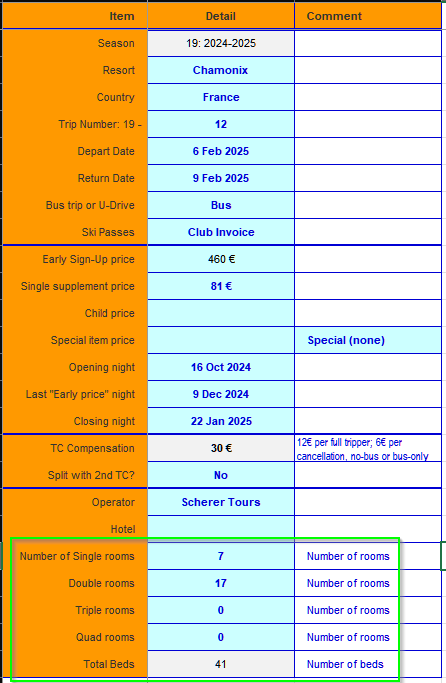
- In this sheet, you'll find a section highlighted in green (see image below) which shows the room breakdown, including the number of single, double, and other types of rooms available. This is where you'll monitor how rooms are assigned and ensure all members have suitable accommodation.
Additionally, the "Trip Data" sheet also lists key dates, including the last "Early Price" night. After this date, the price increases by €25. This is the deadline by which we must confirm if we have enough members (usually more than 20) to keep the bus trip.
¶ Managing Trip Sign-Ups
Sign-ups are managed on the "Tripper List" sheet (see image below). To complete a sign-up for a trip, ensure all the required fields, marked in green, are filled out. These fields include:
- Member Number
- Name of Tripper
- Gender
- Roomie (optional): If the tripper has a specific roommate request, fill in their member number here. Both members must fill in each other's member numbers to ensure correct room assignment.
- Sign-Up Date
- On Bus: Choose from the drop-down menu to indicate whether the tripper will be taking the bus.
- Food Preference (optional): Some members may have specific dietary preferences like vegetarian or other needs.
- Email Address: Enter the tripper's email here.

¶ Completing the Sign-Up
A sign-up is complete once a value appears in the INVOICE column, which is highlighted in blue. At this point, the tripper is officially booked for the trip and their details are fully entered into the system.
¶ Handling Cancellations
If a tripper cancels, you should:
- Enter the cancellation date in the "Cancel Date" column, as highlighted in red.
- Optionally, remove the email address from the sign-up to avoid mistakenly including them in future group emails.
¶ Special Notes for Sign-Ups:
Legacy Members: Some longer-standing members may prefer to sign up using only their name and member number. While this is acceptable, note that you may lose important details such as food preferences. It is recommended to ask newer members to fill out a Trip Form to ensure complete data.
Single Room Requests: If a tripper requests a single room, mark this in the "Single Room" column. Keep in mind that single rooms are limited and allocated based on availability.
Roommate Assignments:
- For double rooms, both trippers must fill in each other's member numbers in the "Roomie" column for the pairing to populate correctly in the room list.
- If a tripper has no roommate preference, they will be automatically assigned a roommate. You can manually adjust room assignments in the "Auto Room List" sheet.
¶ Trip Coordination and Ski Passes
About 6-8 weeks prior to the trip, it's helpful to gather feedback from your trippers regarding the type of ski pass they wish to book. Your trip coordinator will assist you in understanding what group discounts or special offers are available for your particular trip destination.
For any additional assistance or requests with the spreadsheet, always feel free to reach out to the trip coordinator.